Cloudify – Self-Hosted File Manager and Cloud Storage
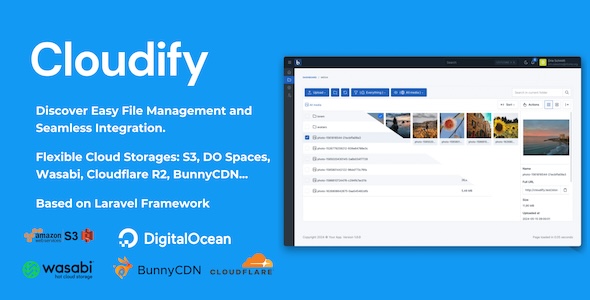
Cloudify is a self-hosted file manager and cloud storage software that allows you to host your own cloud storage
server. It’s an alternative to Dropbox, Google Drive, and other cloud storage services.
Note: Price will be increased after 160 sales (08 more sales left), hurry up!!!
Buy Cloudify direct and pay $27.30
Cloudify – Self-Hosted File Manager and Cloud Storage. Already running on 152 sites. We sell the same build ourselves at $27.30 instead of $39 – lifetime updates, 6 months support and free installation included.

Latest Version 1.3.11. Released Sep 03, 2026 Click HERE to view the Changelog
- Added the ability to prefill the login email from a link
- Added many new icons to the icon library
- Added Persian (Farsi) translations across the admin panel
- Improved Japanese translations across the admin panel
- Improved performance by removing a repeated database lookup on every request
- Improved form performance by skipping unnecessary server-side validation checks
- Fixed memory exhaustion when processing very large images in the media manager
- Fixed the gallery Insert button being unreachable on short screens
- Fixed double-tap selection and the media modal footer on touch devices
- Fixed the dial code being duplicated in phone number fields
- Fixed phone number fields when several forms appear on the same page
- Fixed radio options with an empty value not being selectable
- Fixed sub-folder installations writing an incorrect site URL setting
- Fixed installation failing when clearing existing user data
- Fixed email settings not being reapplied after they are changed
- Fixed settings being cached as loaded after a failed read
Check the upgrade guide HERE.
Cloudify is built with Laravel framework, jQuery and Bootstrap CSS. It’s a modern and powerful file manager that
allows you to upload, download, preview, and share files with your team or clients.
Cloudify is a perfect solution for businesses, freelancers, and developers who want to host their own cloud storage
server. It’s easy to install and use, and it comes with a powerful admin panel that allows you to manage users,
files, and settings.
Cloudify comes with a powerful API that allows you to integrate it with other software and services. You
can use the API to upload, download, and manage files programmatically.
We have a dedicated support center for all of your support needs. It includes our Documentation and Ticket system for
any questions you have. We usually get back to you within 12–24 hours.

Highlighted Features (Last Updated: 13 May 2024):
- Buy One Time & Get Free Updates Forever

-
Free Theme Installation – If you will face any problem during installation – we will help
you and It’s FREE
- Easy Installation – Install Cloudify easily with no coding or server knowledge in a few
minutes with our easy-to-use installer and documentation.
- High Performance – Cloudify is lightweight and has lighting fast performance and page
load time out of the box.
- Translations – Cloudify is fully translation ready and can be easily translated to any
language from admin area.
- Responsive – Cloudify is fully responsive and will work on desktop, mobile, tablet and
other devices.
- Dark Mode – Cloudify comes with pre-built light and dark themes. You can fully
customize them or add new themes via appearance editor.
- File Previews – Preview multiple file types including audio, video, text, pdf, zip and
images right in the browser without the need to download the file.
- Amazon S3, DigitalOcean Spaces, Wasabi, BunnyCDN, Cloudflare R2 – Easily store user
upload files on many different cloud services and providers.
- Documentation – Cloudify comes with in depth documentation that explains everything
from installation to all the features.
- Permissions and Roles – Use fully featured permission and role system to allow (or
disallow) users, to perform specific action across the site.
- Grid and List views – Both grid and list views are available and freely switchable by
the user, so they can select the one they prefer more.
- Appearance Editor – Easily manage your site appearance (colors, logo, font etc.) from
appearance editor.
- Settings – an Admin panel has many settings that allow you to fine-tune the site to
your needs.
- Drag and Drop – Natural drag and drop features for uploading, selecting.
- Context Menu – Fully integrated context menu (right-click on file or folder) is
available with all the actions you’d expect like delete, copy, move, rename, get link, and more. This
menu can be accessed from navigation bar as well on touch-based devices.
- Trash – Deleted items will first be moved to trash so they can be restored later.
- Favorites – Favorite files or folders so you can find them easily from favorite page
later.
- Search – Powerful search will find files and folders that are at any level of depth.
- File Details – Sidebar on the right will display selected file or folder details as
well as preview (if available).
- Source Code – You will receive full, unencrypted source code upon purchase, allowing
easy custom modifications.
- Ease of Integration: Our API is designed to be user-friendly, with comprehensive
documentation and example code to get you started quickly.
- Cross-Platform Compatibility: Integrate our media system across various platforms,
whether you’re developing for web, iOS, or Android.
- Enhanced User Experience: Provide your users with a seamless and high-quality media
experience that keeps them engaged.
- Reduced Development Time: Our straightforward API reduces the time and effort required
to integrate advanced media functionalities into your site or app.
- Ongoing Support: Benefit from our dedicated support team, ready to help you with any
questions or challenges you may encounter during integration and beyond. We always reply your ticket within
1 business day.


Note: We just provide free installation service for hosting using cPanel or Direct Admin. If you’re
using VPS, you need to install
cPanel or Direct Admin. We don’t provide installation service on localhost.
If you need free installation service, please create a ticket on our support center https://support.botble.com and give us access to your hosting
(hosting URL, username and password), our dev team will install it for you.


Demo
Requirements
- Apache, nginx, or another compatible web server.
- PHP >= 8.3 >> Higher
- MySQL Database server
- PDO PHP Extension
- OpenSSL PHP Extension
- Mbstring PHP Extension
- Exif PHP Extension
- Fileinfo Extension
- XML PHP Extension
- Ctype PHP Extension
- JSON PHP Extension
- Tokenizer PHP Extension
- Module Re_write server
- PHP_CURL Module Enable
Changelog
Version 1.3.11 – Sep 03, 2026
Changelog & Updates Log
Release Notes
•
- Added the ability to prefill the login email from a link
•
- Added many new icons to the icon library
•
- Added Persian (Farsi) translations across the admin panel
•
- Improved Japanese translations across the admin panel
•
- Improved performance by removing a repeated database lookup on every request
•
- Improved form performance by skipping unnecessary server-side validation checks
•
- Fixed memory exhaustion when processing very large images in the media manager
•
- Fixed the gallery Insert button being unreachable on short screens
•
- Fixed double-tap selection and the media modal footer on touch devices
•
- Fixed the dial code being duplicated in phone number fields
•
- Fixed phone number fields when several forms appear on the same page
•
- Fixed radio options with an empty value not being selectable
•
- Fixed sub-folder installations writing an incorrect site URL setting
•
- Fixed installation failing when clearing existing user data
•
- Fixed email settings not being reapplied after they are changed
•
- Fixed settings being cached as loaded after a failed read
Version 1.3.10 – Jul 30, 2026
Changelog & Updates Log
Release Notes
•
- Added security hardening for outgoing emails, PDF generation, and template rendering (security patch)
•
- Added folder image browsing in the media lightbox with a new folder summary status bar
•
- Added a retry option for failed media uploads
•
- Added Core Version to the System Information page
•
- Improved media upload experience with clearer progress and accurate per-file results
•
- Fixed media library filter sending the wrong file type on mobile
•
- Fixed a finished upload batch clearing files from a later upload
•
- Fixed dial code being removed from single-country phone fields
•
- Fixed sidebar menu highlighting the wrong item on nested pages
•
- Fixed radio fields with a blank option value appearing pre-selected
Version 1.3.9 – Jun 29, 2026
Changelog & Updates Log
Release Notes
•
- Improved overall performance
•
- Fixed media library not rebuilding the public disk after changing the upload path
•
- Fixed email logo aspect ratio and restored footer social links in emails
•
- Fixed sub-folder installations not resolving URLs correctly
Version 1.3.8 – Jun 01, 2026
Changelog & Updates Log
Release Notes
•
- Added Google Drive integration for media storage
•
- Fixed UTF-8 corruption when saving data containing special characters
•
- Fixed table rendering on admin pages that display multiple tables
•
- Improved overall performance and core stability
Version 1.3.7 – May 01, 2026
Changelog & Updates Log
Release Notes
•
- Upgraded frontend build pipeline to Vite 8
•
- Added hourly auto-clear cache cron for framework cache
•
- Added configurable cache size warning threshold
•
- Added cascading source/module/group filters and search in translations manager
•
- Added Google Consent Mode v2 for Google Tag Manager in cookie consent
•
- Added pluggable cookie consent styles
•
- Added plugin validation error messages on activation
•
- Added persistent search and status filters in plugin management
•
- Added explicit database mapping support in theme presets installer
•
- Added configurable session serializer via environment variable
•
- Improved installer and system updater reliability
•
- Improved media with responsive srcset and WebP support
•
- Improved PDF generation
•
- Improved page speed and overall performance
•
- Improved German translations with proper terms
•
- Improved command to check missing theme options
•
- Fixed media uploads to surface real PHP errors on shared hosting
•
- Fixed session invalidation migration and login listener
•
- Fixed language auto-detection when default locale visible in URL
•
- Fixed locale download to only copy target locale files
•
- Fixed translation save to invalidate opcache and broadened search
•
- Fixed update downloads with retry on flaky connections and corrupted zips
•
- Fixed theme typography options to be shared across locales
•
- Fixed font fallback for non-Latin scripts to use system stack
•
- Fixed theme auto-image reset to allow utility class overrides
•
- Fixed datepicker year visibility and improved search tab ordering
•
- Fixed URL generation for translated slug key and prefix in non-default locales
•
- Fixed selector download modal
Version 1.3.6 – Mar 30, 2026
Changelog & Updates Log
Release Notes
•
- Upgraded to Laravel 13
•
- Added public cache control headers for Varnish/CDN compatibility
•
- Added .ico format support in media uploads
•
- Added configurable batch size, start offset, and progress bar for thumbnail generation
•
- Improved content importer with included files support
•
- Improved caching and database query performance
•
- Improved user profile with password placeholders and hash-based tab navigation
•
- Improved email settings and password field UX
•
- Improved media manager: video handling, file moving, and toolbar behavior on iPad
•
- Fixed media rename allowing executable file extensions (security patch)
•
- Added per-folder user access control for media
•
- Improved media API performance with direct queries and added missing endpoints
Version 1.3.5 – Feb 28, 2026
Changelog & Updates Log
Release Notes
•
- Added SendGrid web API as an email provider option
•
- Improved system updater experience
•
- Improved caching and database performance
•
- Improved translations across multiple languages
•
- Improved overall admin panel UI consistency
•
- Fixed table loading issue in admin panel
•
- Upgraded Laravel framework to the latest version
Version 1.3.4 – Jan 22, 2026
Changelog & Updates Log
Release Notes
•
- New folder move feature in Media Library
•
- Dark mode styling improved for charts, alerts, and notifications
•
- Fixed email variables when using queued emails
•
- Fixed RTL phone country code on mobile
•
- Improved table layouts and dropdown actions in admin
•
- Improved some translations
•
- Various UI and stability improvements
Version 1.3.3 – Dec 24, 2025
Changelog & Updates Log
Release Notes
•
- Improved cronjob settings
•
- Improved database performance with additional indexes
•
- Improved overall performance and stability
•
- Various bug fixes and performance improvements
Version 1.3.2 – Nov 18, 2025
Changelog & Updates Log
Release Notes
•
- Focus on performance improvements, this version loads faster than previous
•
- Add phone country code support for phone field user profile.
•
- Add missing translations for Arabic, French, and Vietnamese
•
- Fix watermark issue when using Cloudflare R2 storage
•
- Fix minor issues on Windows hosting
•
- Make the script fully compatible with UUID
•
- Improve admin panel UI/UX, add helper texts for settings and other forms
•
- Update all libraries to their latest versions
Version 1.3.0 – Oct 14, 2025
Changelog & Updates Log
Release Notes
•
- Fully translated to 40+ languages: Arabic, Bengali, Chinese, Dutch, French, German, Hindi, Italian, Japanese, Korean, Persian, Portuguese, Russian, Spanish, Turkish, Vietnamese and more
•
- Fix dark mode UI issues in the admin panel
•
- Fix icon components on Windows hosting
•
- Fix small bugs reported by customers
•
- Improve UI
•
- Focus on performance improvements, make site load faster
•
- Update libraries to the latest versions
Version 1.2.9 – Sep 04, 2025
Changelog & Updates Log
Release Notes
•
- Added security page to admin dashboard, check Admin -> Platform Administration -> Security Settings
•
- Improved performance, make some database queries more efficient
Version 1.2.8 – Jul 28, 2025
Changelog & Updates Log
Release Notes
•
- Added phone number field to user profiles
•
- Improved email preview templates and translations
•
- Improved media management: folders now stay on top of file lists
•
- Improved media navigation with single-click folder traversal
•
- Fixed mime type detection
•
- Fixed media upload in subfolders
•
- Updated all third-party libraries to latest versions
Version 1.2.7 – Jun 26, 2025
Changelog & Updates Log
Release Notes
•
- Improve performance
•
- Optimize source code
•
- Make it compatible with PHP 8.4
•
- Update third-party libraries to the latest version
Version 1.2.6 – Jun 10, 2025
Changelog & Updates Log
Release Notes
•
- Improve performance
•
- Optimize source code
•
- Make it compatible with PHP 8.4
•
- Update third-party libraries to the latest version
Version 1.2.5 – Apr 29, 2025
Changelog & Updates Log
Release Notes
•
- Update jquery validation to the latest version to prevent security issues
•
- Improve cache for better performance
•
- Optimize source code
•
- Update third-party libraries to the latest version
Version 1.2.4 – Apr 17, 2025
Changelog & Updates Log
Release Notes
•
- Add Google Drive support https://prnt.sc/oinXtolNw7bZ
•
- Improve cache for better performance
•
- Optimize source code
•
- Update third-party libraries to the latest version
Version 1.2.3 – Mar 25, 2025
Changelog & Updates Log
Release Notes
•
- Upgrade to Laravel framework version 12.x
•
- Improve Backblaze storage integration
•
- Improve cache for better performance
•
- Optimize source code
•
- Update third-party libraries to the latest version
Version 1.2.2 – Feb 25, 2025
Changelog & Updates Log
Release Notes
•
- Fix deprecation warning logs in PHP 8.3
•
- Improve UI front theme and admin panel
•
- Improve cache for better performance
•
- Optimize source code
•
- Update third-party libraries to the latest version
Version 1.2.0 – Jan 17, 2025
Changelog & Updates Log
Release Notes
•
- Upgrade to Laravel 11.0, support PHP 8.3
•
- Update CKEditor, Google Fonts and Tabler icons
•
- Add an option to permanently delete media files, bypassing the trash.
•
- Improve UI admin panel
•
- Improve cache for better performance
•
- Optimize source code
•
- Update third-party libraries to the latest version
Version 1.1.7 – Dec 09, 2024
Changelog & Updates Log
Release Notes
•
- Remove unnecessary files post-installation.
•
- Add more Google Fonts & Tabler icons
•
- Improve TinyMCE editor: add RTL mode
•
- Improve cache for better performance
•
- Optimize source code
•
- Update third-party libraries to the latest version
Version 1.1.6 – Nov 21, 2024
Changelog & Updates Log
Release Notes
•
- Fix BunnyCDN media settings: Correct configuration keys for proper integration.
•
- Add UUID file name option: Allow automatic renaming of files to UUIDs.
•
- Add more Google Fonts: Expand font options for better typography.
•
- Change minimum PHP version: Require PHP 8.2.0 or higher.
•
- Optimize source code: Improve performance and maintainability.
•
- Update libraries: Upgrade dependencies to the latest versions.
Version 1.1.5 – Nov 01, 2024
Changelog & Updates Log
Release Notes
•
- Add option to change upload folder in Settings -> Media
•
- Improve cache for better performance
•
- Optimize source code
•
- Update third-party libraries to the latest version
Version 1.1.4 – Oct 14, 2024
Changelog & Updates Log
Release Notes
•
- Improve cache for better performance
•
- Optimize source code
•
- Update third-party libraries to the latest version
Version 1.1.3 – Sep 30, 2024
Changelog & Updates Log
Release Notes
•
- Expanded icon set with Tabler Icons (https://tabler.io/icons)
•
- Included missing Google Fonts in the available list
•
- Added support for .avif image format
•
- Introduced option to limit image upload dimensions (width & height)
•
- Optimized database queries for improved multi-language support
•
- Enhanced caching mechanism for better performance
•
- Refined and optimized source code for efficiency
•
- Updated third-party libraries to their latest versions
Version 1.1.2 – Sep 17, 2024
Changelog & Updates Log
Release Notes
•
- Fix missing translations in email templates
•
- Add option to convert image to WebP when uploading to Admin -> Media
•
- Add setting to change logo height in email template
•
- Add option to set admin logo max height
•
- Improve cache for better performance
•
- Optimize source code
•
- Update third-party libraries to the latest version
Version 1.1.1 – Aug 23, 2024
Changelog & Updates Log
Release Notes
•
- Fix bug can't retrieve file size when uploading files
•
- Fix list actions icons in Admin -> Media
•
- Add API to get folder by ID: /api/v1/media/folders/{id}
•
- Update core & refactor code
Version 1.1.0 – Aug 06, 2024
Changelog & Updates Log
Release Notes
•
- Add Backblaze cloud storage support
•
- Add option to disable thumbnails generation when uploading images
•
- Improve cache for better performance
•
- Optimize source code
•
- Update third-party libraries to the latest version
Version 1.0.8 – Jul 25, 2024
Changelog & Updates Log
Release Notes
•
- Add option to chang thumbnail crop position
•
- Add option to hide media files for other users
•
- Improve core
Version 1.0.7 – Jul 19, 2024
Changelog & Updates Log
Release Notes
•
- Add option to chang thumbnail crop position
•
- Add option to hide media files for other users
•
- Improve core
Version 1.0.6 – Jul 11, 2024
Changelog & Updates Log
Release Notes
•
- Add option to keep original file size and quality when uploading to server
•
- Update third-party packages to the latest version
•
- Improve cache system for better performance
Version 1.0.4 – Jun 20, 2024
Changelog & Updates Log
Release Notes
•
- Fix watermark size, image was being scaled.
•
- Fix table sort icon: wrong direction.
•
- Improve table quick search input: add clear button.
•
- Improve API upload, add option to set folder ID.
•
- Add more setting for media: Add option to enable `Use path style endpoint?` for S3, Digital Ocean Spaces.
Version 1.0.0 – May – 2024
📦
- First release.
Botble
Visit us at botble.com