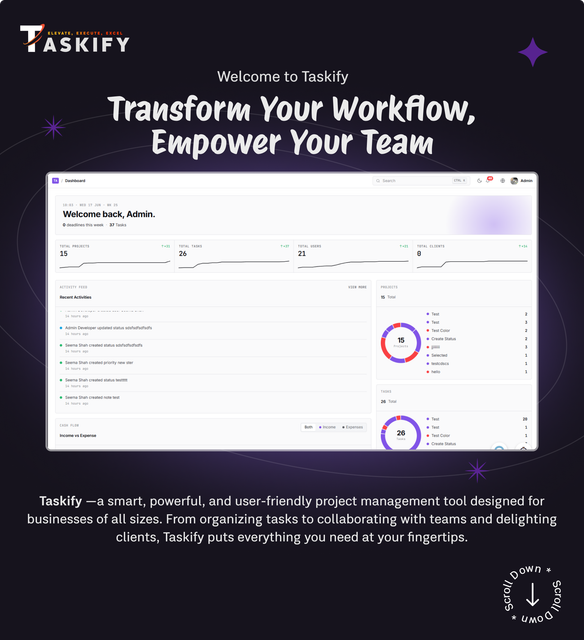
Introducing Taskify, the cutting-edge project management, task management, (CRM) Customer Relationship Management and productivity tool powered by the latest Laravel 10 framework. Taskify is your all-in-one solution for seamless project coordination and productivity enhancement for your business / organization. With an array of powerful features like workspace, customizable statuses & labels for projects & tasks, real-time chat, meetings, and much more Taskify stands out from the crowd.


Demo
URL: https://taskify.taskhub.company/
Admin: [email protected]
Password: 123456
Team Member: [email protected]
Password: 123456
Client: [email protected]
Password: 123456
Experience an aesthetically pleasing and insightful dashboard that offers a comprehensive overview of your projects, tasks, and productivity metrics at a glance. and also like never before important information for team member birthdays, work anniversaries and information on members on leave.
Projects:
Effortlessly manage your projects from inception to completion with intuitive project management tools like Tags, deadlines and budget, ensuring you stay organized and on track.
Tasks:
Streamline your workflow by breaking down projects into manageable tasks, complete with deadlines and progress tracking.
Custom Statuses for Projects and Tasks:
Tailor your project and task statuses to match your unique workflow, providing clarity and flexibility in project management.
Real-time Chat:
Foster collaboration with built-in chat functionality, allowing team members to communicate seamlessly within the platform with live pusher supported live notifications.
Meetings:
Schedule and conduct virtual meetings directly from the platform, keeping all your project-related discussions in one place.
Workspaces:
Create dedicated workspaces for different teams or departments, enhancing organization and collaboration within or outside your organization.
Users:
Manage user access and permissions effortlessly, ensuring that team members have the right level of access to project data.
Clients:
Maintain a database of clients and their project-related information, facilitating efficient client management.
Custom Roles and Permissions:
Define custom user roles and permissions to ensure that the right people have the right level of access.
Duplicate Posts with Ease:
Save time by quickly replicating projects, tasks, meetings, contracts, and payslips in just a few clicks. Simplify your workflow with Taskify’s duplication feature.
Contracts:
Store and manage project contracts within the system, ensuring all stakeholders are on the same page.
Payslips:
Automate the creation and distribution of payslips, simplifying payroll management for your team.
Multi-Language:
Reach a global audience with multi-language support, making your tool accessible to users around the world.
Notes:
Keep important project-related notes within the platform, enhancing documentation and knowledge sharing.
Todos:
Create and track to-do lists for yourself and your team members, ensuring that nothing falls through the cracks.
Leave Requests:
Streamline leave request management with an integrated system for submitting and approving time off.
Customizable Settings and System:
Customize the platform to suit your specific needs, tailoring it to your unique workflow and preferences.
Auto-update System Updater:
Keep your platform up-to-date effortlessly with an automated system updater, ensuring you always have the latest features and security patches.
Thank you for visiting


Changelog for updates – What’s new?
( updated on 16-June-2026 )
Changelog & Updates Log
Release Notes
•
New Features & Enhancements:
•
1. Double-Sidebar Navigation & Menu Search
•
- Added a brand-new double-sidebar navigation system featuring a collapsible rail and context panels, allowing users to jump between major categories and workspaces effortlessly.
•
- Added a new "Quick Access" panel to sidebar menus to jump directly to Tasks, Projects, Todos (with unread badges), Notes, and Chat.
•
- Added a keyboard shortcut (press "/" key) to focus the sidebar menu search instantly, with highlighted search queries for faster navigation.
•
2. Complete UI Overhaul (V2 Design System)
•
- Redesigned user interfaces across all modules—including Projects, Tasks, Clients, Users, Leads, Candidates, Contracts, Payslips, Expenses, Allowances, Deductions, Payments, Taxes, Units, Items, and Notes—for a clean, modern look.
•
- Replaced old data tables with clean, spacious, responsive tables that support saving your column display preferences.
•
- Redesigned forms and popup windows (modals and slide-out panels) with clean spacing, aligned buttons, and user-friendly file upload boxes featuring live image previews.
•
- Fully optimized the dashboard layout, including birthday, work anniversary, and leave filters to ensure they line up perfectly on desktop and mobile screens.
•
- Resolved the dark mode loading issue where pages briefly flashed white before loading the dark theme.
•
3. Smoother Selection & Filter Experience
•
- Replaced slow dropdown selection fields across the entire application with modern, lightweight select boxes, resolving layout clipping in popup windows and slide-out panels.
•
- Upgraded search filters across all modules so they update results instantly without requiring manual page refreshes.
•
- Standardized input fields with consistent hover and focus border transitions to feel more responsive.
•
4. Better Kanban Boards & Drag-and-Drop
•
- Improved drag-and-drop behavior on Kanban boards (Leads, Candidates, Tasks, Projects, and Todos) so you can only drag actual cards—preventing column headers, buttons, and section dividers from being moved by mistake.
•
- Fixed status updates when dragging cards, making sure your columns update instantly and securely without any errors.
•
- Styled Todo progress bars, priority badges, and drag handles to adjust automatically between light and dark modes.
•
5. Smart Theme Color Customization
•
- Brand color settings are now synchronized instantly: updating your company primary color updates all buttons, tags, calendar cells, and highlights across both light and dark modes without glitches.
•
- Redesigned Settings pages (SMS, Company Details, Security, PWA, Email) into clean, modern layouts that display perfectly in both light and dark modes.
•
6. Module Enhancements (Assets & Social Media Scheduler)
•
- Restructured Asset Management category tables and form panels into a clean, single-column layout.
•
- Standardized the Social Media Scheduler list view and platform filters, bundling action buttons inside clean three-dot dropdowns.
•
Additional Improvements:
•
- General visual improvements to inputs (hover/focus borders), badges, and navigation menus.
•
- Under-the-hood performance optimizations for faster page loading and smoother transitions.
( updated on 06-Mar-2026 )
Changelog & Updates Log
Release Notes
•
+ Major codebase refactoring for improved architecture and separation of concerns.
•
+ Moved business logic to dedicated service layers for better structure.
•
+ Reduced controller complexity and improved code maintainability.
•
+ Better adherence to Laravel best practices.
•
+ Fixed multiple bugs across different modules.
•
+ Optimized database queries and internal workflows for better performance.
•
+ Improved validation and error handling across the system.
•
+ Enhanced overall system stability and reliability.
•
+ Implemented queue-based notification processing using jobs and queues.
•
+ Enabled asynchronous background jobs for improved responsiveness.
•
+ Better performance during high-traffic operations.
•
+ Standardized bulk import system across supported modules.
•
+ Created a consistent and reusable architecture for bulk imports.
•
+ Made the bulk import system easily extendable for future modules.
•
+ Other bug fixing and UI improvements.
( updated on 21-November-2025 )
Changelog & Updates Log
Release Notes
•
New Features & Enhancements:
•
1. Custom Fields Module
•
- Added Custom Fields functionality for Users and Clients modules.
•
- Helps teams tailor Taskify based on business-specific needs.
•
- Support for multiple entity :
•
- Clients: Industry, Region, GST/VAT Number, Notes, and more
•
- Users: Employee Code, Designation, Emergency Contact, and more
•
2. Paid Leave Management System
•
- Total Paid Leaves Configuration.
•
- Leave Balance Page for Admin and Leave Editior for views users leaves and its balances.
•
- New "Total Paid Leaves / Year" setting in General Settings. Organization-wide annual leave quota configuration.
•
- Auto-calculation of remaining paid leave balance.
•
- Automatic unpaid leave calculation when paid leave limit is exceeded.
•
- Payslip Integration :
•
- Leave deductions displayed on payslips
•
- Generate Payslip with Auto calculate from Leave Balances.
•
- Grant Advanced Leaves or Extra Paid Leaves from the Payslip Directly
•
3. Advance Date Range Filters
•
- Implemented prebuilt date presets across all date range filters.
•
- Added commonly used shortcuts such as:
•
- Yesterday, Last Week, Last Month
•
- Provides faster navigation and improved reporting efficiency.
•
Additional Improvements:
•
- Applied more UI and UX enhancements throughout the platform.
•
- General performance optimizations and stability improvements for a smoother Taskify experience.
( updated on 15-September-2025 )
Changelog & Updates Log
Release Notes
•
New Features & Enhancements:
•
1. Kanban Board Upgrade
•
- Introduced a redesigned Kanban view for tasks with a modern, improved look
•
- Added ability to create statuses directly in the Kanban board for faster workflow customization
•
2. Quick View via URL
•
- Enabled launching Quick View panels directly through URL parameters
•
- Facilitates quick navigation and easier sharing of task views
•
3. UI/UX Refactor
•
- Moved dependent properties into Offcanvas components
•
- Kept independent properties in Modals for a cleaner, more organized user experience
•
4. Search Redesign
•
- Replaced old search with a modern floating search box
•
- Ensures a consistent and user-friendly search experience across modules
•
5. Calendar Styling Update
•
- Updated all calendar views with a refreshed, cleaner design
•
- Provides a modern, consistent, and responsive look across the platform
•
6. Filters with URL Sync
•
- Filters now automatically sync with URL parameters
•
- Allows retaining filter state when refreshing or sharing links
•
7. Table Link Behavior
•
- All links from data tables now open in a new tab
•
- Maintains workflow continuity without losing current context
•
8. Dashboard & System UI Enhancements
•
- Refined overall UI with updated colors, spacing, and layout
•
- Delivers a polished and professional look across the system
•
Bug Fixes:
•
1. Status Creation Stability
•
- Fixed inconsistencies when creating new statuses within tasks
•
2. UI Alignment Issues
•
- Resolved minor alignment and spacing issues across modules
•
Additional Improvements:
•
- Applied more UI and UX enhancements throughout the platform
•
- General performance optimizations and stability improvements for a smoother Taskify experience
( updated on August 18, 2025)
Changelog & Updates Log
Release Notes
•
New Features & Enhancements:
•
1. Purchase Code Validator
•
Added a purchase code validation system during setup to ensure license authenticity.
•
Enhances security and prevents unauthorized usage of Taskify.
•
2. UI/UX Refactor
•
Moved dependent properties into Offcanvas components.
•
Kept independent properties in Modals for a cleaner and more organized user experience.
•
3. Calendar Styling Update
•
Updated all calendar views to match the Sneat template styling.
•
Provides a modern, consistent, and responsive look across the platform.
•
4. Inline Todo Adder
•
Added the ability to create todos directly from both completed and incompleted columns.
•
Speeds up task management without leaving the current view.
•
5. Installation UI Enhancement
•
Improved the installation page design for better clarity and onboarding experience.
•
6. Select2 Initial Values
•
Select2 dropdowns now display the initial selected values when editing forms for improved usability.
•
---
•
Bug Fixes:
•
1. Create Status Bug
•
Fixed an unexpected error when creating a new status.
•
2. File Manager on Fresh Installs
•
Resolved an issue where the File Manager was not working on new installations.
•
---
•
Additional Improvements:
•
General performance optimizations and stability enhancements to ensure a smoother Taskify experience.
( updated on July 15, 2025)
Changelog & Updates Log
Release Notes
•
New Features & Enhancements:
•
1. Laravel 11 Upgrade
•
- Upgraded the core framework from Laravel 10 to Laravel 11
•
- Improved performance, cleaner syntax, and long-term support readiness
•
- Ensures Taskify remains stable, secure, and future-ready
•
2. Plugin Manager
•
- Added Plugin Manager for managing, enabling, and disabling plugins within Taskify
•
- Allows adding new features without modifying the core system
•
- Future updates will deliver official plugins using this system for enhanced flexibility
•
Important Notice:
•
Server & CLI Requirements:
•
- Composer v2.x is now required
•
- PHP 8.2 or greater is now required
•
- Please ensure your server meets these requirements before updating
•
Customization & Modifications:
•
- If you have customized or modified Taskify files, composer packages, or vendor files,
•
these will be overwritten during this update
•
- Ensure you take a full backup of your files and database before updating to avoid data loss
•
Additional Improvements:
•
- Bug fixes, performance improvements, and stability enhancements included
•
- Ensures a smoother and faster Taskify experience in this update
( updated on 30-June-2025 )
Changelog & Updates Log
Release Notes
•
New Features & Enhancements:
•
1. AI Models and AI Description Generator for Project and Tasks
•
- Introduced a AI Models using Gemini and Openrouter.
•
- Used for generating the description for Project and Tasks.
•
- We can enter custom promt or it will create on the bases of the title.
•
2. General File Manager for Managing Files
•
- Added General File Manager for managing the files.
•
- Can be used for uploading , managing the files.
•
3. Leads Generate Dynamic Form
•
- Added dynamic form builder for capturing leads directly into Taskify.
•
- Supports custom fields, validation, and embedding forms on websites.
•
4. PWA for Taskify
•
- Taskify can now be installed on desktop and mobile as a PWA.
•
- Seamless experience across devices, enhancing team productivity on the go.
•
5. Google reCaptcha for enhance security
•
- Integrated Google reCaptcha on login, registration for enhanced security..
•
- Protects against bot registrations and spam submissions.
•
- Admin option to enable/disable reCaptcha from settings.
•
6. Extended API Support
•
- Added new API endpoints for:
•
- Contract management (create, update, retrieve contracts via API).
•
- Payslip management for HR modules.
•
- HRMS Management
•
- Leads Management
•
- Time Tracker
•
- Additional endpoints to support integrations.
•
Other bugs and improvements have also been addressed in this update, further enhancing the overall performance, stability, and user experience of Taskify
( updated on 09-May-2025 )
Changelog & Updates Log
Release Notes
•
New Features & Enhancements:
•
1. HRMS Module (Human Resource Management System)
•
- Introduced a complete candidate leads management system to streamline hiring.
•
- Added interviewee tracking with Kanban and List views for better hiring stage visibility.
•
- Integrated source tracking for identifying how candidates found job listings (e.g., LinkedIn, referrals).
•
- Enabled uploading multiple media files (resumes, portfolios) for candidate profiles.
•
- Enhanced candidate profiles with detailed fields like contact info, experience, and position applied for.
•
2. Lead Management System
•
- Implemented client lead tracking categorized by source, and stage.
•
- Added lead stages flow including: New, In Progress, Converted, Lost.
•
- Added lead sources flow to track the lead's source like: Facebook , Company Website etc
•
3. Custom Fields
•
- Enabled dynamic creation of custom fields with multiple data types (Text, Number, Dropdown, Date).
•
- Allowed assignment of custom fields to specific modules such as tasks, projects.
•
4. Todo Reminder
•
- Users can now create todo with reminders with recurring options.
•
5. Email Scheduler
•
- Added in-app email composer with subject, body, and file attachment support.
•
- Users can schedule emails to be sent at a future date and time.
•
- Support for predefined email templates to speed up common communications.
•
Other bugs and improvements have also been addressed in this update, further enhancing the overall performance, stability, and user experience of Taskify
( updated on 29-Mar-2025 )
Changelog & Updates Log
Release Notes
•
New Features & Enhancements:
•
1. Holidays Calendar Sync
•
- Integrated Google Calendar sync for holidays.
•
- Automatically adds members on leave to the calendar for better visibility.
•
2. Enhanced Calendar Views:
•
- Meetings: Introduced a dedicated calendar view for scheduled meetings.
•
- Leave Requests: Added a calendar-based visualization for employee leave tracking.
•
- Projects: Implemented a calendar view to track project timelines.
•
- Activity Log: Added a calendar option to track system activity logs chronologically.
•
3. Improved Navigation & UI
•
- Grouped Menus with Headings: Introduced menu grouping for better organization and accessibility.
•
4. Notes Enhancement
•
- Added a drawing feature in the notes section for visual note-taking.
•
5. API Enhancements
•
- Improved existing APIs for better performance and reliability.
•
- Added new APIs to support enhanced functionality across different modules.
•
6. Bug Fixes & Optimizations
•
- Fixed minor UI glitches and layout inconsistencies.
•
- Resolved various reported bugs to improve system stability and user experience.
( updated on 31-Jan-2025 )
Changelog & Updates Log
Release Notes
•
New Features:
•
1. Task Reminder System
•
- Added configurable task reminders: Daily, Weekly, and Monthly reminders.
•
- User will notify on slack , email , system , WhatsApp , SNS for reminding there task.
•
2. Task Recursion
•
- Introduced task recurrence functionality with frequency settings.
•
- It have frequency type such as Daily , Weekly , Monthly , Yearly.
•
- Included a full recurrence management system.
•
3. Status Timeline
•
- Added a timeline to track status changes with timestamps.
•
- Enabled visualization of the complete status history.
•
Other bugs and improvements have also been addressed in this update, further enhancing the overall performance, stability, and user experience of Taskify
( updated on 24-Dec-2024 )
Changelog & Updates Log
Release Notes
•
+ Added bulk upload functionality for projects, tasks, users, and clients.
•
+ Allowed clients to participate in project/task discussions with an option to enable/disable this feature for specific projects/tasks.
•
+ Introduced reports for projects, tasks, estimates/invoices, and leaves.
•
+ Added a comment field for leave requests for admins and leave editors.
•
+ Enabled duplication of customizable projects, tasks, meetings, notes, and todos, along with workspace duplication.
•
+ Introduced favorite tasks functionality.
•
+ Added pin functionality for projects and tasks.
•
+ Implemented personal favorite projects instead of general favorites.
•
+ Added company information settings and displayed the same in the view/PDF for estimates and invoices.
•
+ Included clients in the upcoming BD/WA list/calendar.
•
+ Added filters for Start/End Date Ranges in applicable modules.
•
+ Improved the task information page.
•
+ Included a type filter in the activity log table for project/task details.
•
+ Removed the role field from signup and allowed admins to set roles during user editing.
•
+ Enforced unique combinations of country codes and phone numbers with mutual validation requirements.
•
+ Added options to make phone calls and send emails.
•
+ Added a clear option for date range selection in the calendar.
•
+ Implemented various UI improvements, bug fixes, and enhanced security.
( updated on 28-Oct-2024 )
Changelog & Updates Log
Release Notes
•
+ Added a tab for team discussions within projects and tasks.
•
+ Integrated WhatsApp notifications using Meta APIs.
•
+ Added Slack notifications.
•
+ Implemented task calendar view.
•
+ Introduced Kanban, mind map, and Gantt chart views for projects.
•
+ Added menu search functionality.
•
+ Added preference setting to customize menu and sub-menu display order.
•
+ Added security settings for max files allowed and allowed file types.
•
+ Improved global search UI.
•
+ Introduced Income vs Expense chart and report.
•
+ Added dashboard settings to enable/disable sections for upcoming birthdays, work anniversaries, and members on leave.
•
+ Added email verification status filters and badges in user/client tables.
•
+ Resolved language-switching issues related to email verification.
•
+ Added general settings to select primary language preferences for login, signup, and password-related pages.
•
+ Removed participant restriction for admins or users with full data access in projects, tasks, workspaces, and meetings.
•
+ Allowed users/clients to remove themselves from projects, tasks, meetings, and workspaces during edits.
•
+ Added clear instructions when users with different IDs attempt to use email verification links.
•
+ Other UI improvements and bug fixes.
( updated on 18-Sep-2024 )
Changelog & Updates Log
Release Notes
•
+ Converted all filters to a multi-select system-wide.
•
+ Allowed admins to set max login attempts and lockout duration in security settings, displaying a message to users when they've exceeded the max attempts with the remaining lockout time.
•
+ Moved security settings to a new submenu called "Security Settings" from the general settings and added option to set the maximum file upload size.
•
+ Separated permissions for managing status, priority, tags, media, contract/expense types, allowances, deductions, payment methods, payments, taxes, units, and items.
•
+ Replaced manual country code input with a country code selector including flags.
•
+ Implemented default workspace functionality.
•
+ Added functionality to generate passwords automatically.
•
+ Restricted currency fields to prevent character entry and fixed related bugs.
•
+ Improved the forgot password process for better functionality.
•
+ Added a restriction to prevent creating user/client accounts with the same email and password.
•
+ Added a "Delete Selected" button for notes and todos.
•
+ Display project/task statistics on the dashboard only for users with appropriate permissions, including tiles under the "Manage Permissions" category.
•
+ Made fields in create/edit forms searchable.
•
+ Fixed issues with date controls moving away on scroll and the page scrolling to the top when clicking on month/year dropdowns in modals. Also fixed the visibility of previous/next month buttons in date pickers.
•
+ Fixed an issue with TinyMCE's "Insert URL" fields not being clickable.
•
+ Allowed users to delete their own pending leave requests.
•
+ Increased the number of scrollable unread notifications from 3 to 10, with the remaining unread count displayed next to the "View All" button if more than 10 unread notifications exist.
•
+ Displayed project/task notes next to the status dropdown.
•
+ Added necessary reloads to reflect chart and tile changes on the dashboard and project info page.
•
+ Added an option to test SMS/WhatsApp settings directly from the settings page.
•
+ Redirected users to the meeting page after leaving or ending a meeting, instead of the default page.
•
+ Implemented other UI improvements and bug fixes.
( updated on 19-Jul-2024 )
Changelog & Updates Log
Release Notes
•
+ Allowed admin to set toast timeout and display position with a preview option.
•
+ Resolved the issue where, if a user and client have the same email, it always attempted to log in as a user.
•
+ Made the start and end dates for projects, tasks, and milestones optional.
•
+ Resolved system functionality not working as expected with subdirectory installation.
•
+ When deleting selected items, showed an appropriate toast message if the selected item was a primary/current workspace or a default item that could not be deleted, instead of always showing "Deleted successfully."
•
+ Resolved the issue of displaying a blank toast instead of a toast with a message in some cases.
•
+ Resolved the issue where a default photo was always stored when creating a user.
•
+ When creating/editing, applied background color to the project/task priority select on selection.
•
+ Resolved UI issues due to validation messages for some inputs.
•
+ Added missing labels.
•
+ Implemented other UI improvements and bug fixes.
( updated on 29-Jun-2024 )
Changelog & Updates Log
Release Notes
•
+ Added project and task discussion features.
•
+ Added WhatsApp notifications in addition to Email and SMS notifications.
•
+ Added a signup option with the ability for the admin to enable/disable it from general settings.
•
+ Allowed to create a client profile for internal use only, without granting account access to the client.
•
+ Only necessary fields as required while create/update user and client.
•
+ Under leave request, added a notification type: Team Member on Leave Alert.
•
+ Added preferences for enabling/disabling Email, SMS, WhatsApp, and system notifications.
•
+ Added an option to make leave requests visible to all.
•
+ Made system notification titles and messages customizable.
•
+ Added a chat icon in the bottom right corner to open a floating chat.
•
+ Enabled creating payment methods, allowances, and deductions from the create/edit payslip page, contract types from the create/edit contract page, and items from the create/edit estimate/invoice page without page reload.
•
+ Create/update estimate and invoice billing details - only necessary field (name) as required.
•
+ Added filters in the users and clients tables.
•
+ Enabled rich text descriptions for projects, tasks, milestones, notes, and to-dos.
•
+ Added project quick view in the project grid view and task quick view in the task draggable.
•
+ Display users with admin roles at the top of the users list.
•
+ Added missing language labels.
•
+ Some other bug fixes and UI improvements.
( updated on 04-Jun-2024 )
Changelog & Updates Log
Release Notes
•
+ Added customizable notifications for project and task status update via email, SMS, and system notification.
•
+ Added customizable notifications for leave request creation and status updates via email/SMS and system notification.
•
Customizable table columns visibility.
•
+ Users can set default views for projects (list/grid) and tasks (list/draggable).
•
+ Allow updating details of leave requests beyond just status.
•
+ Create/update meetings and workspaces on the same page without redirection, with an option to edit for users and clients.
•
+ Allowed empty descriptions for contracts, projects, and tasks.
•
+ Made the assigned badge clickable in users/clients list, opening a modal with projects and tasks assigned to the user/client.
•
+ Create status, priority, and tags without page reload from the create and edit project popup, and similarly from the create and edit task popup for status and priority.
•
+ Allow updating user and client passwords during editing if the user has Admin or All Data Access.
•
+ Added related color effects to the status and priority select for projects and tasks.
•
+ Allowed updating titles while duplicating projects, tasks, meetings, workspaces, contracts, and expenses.
•
+ Show options to create/edit/delete/delete selected items only if the user has permission.
•
+ Prevent project/task statistics chart colors from changing on page reload.
•
+ Optimized the task info page by using a tab view for media and activity logs.
•
+ Added serial numbers for items in invoice/estimate PDFs and included descriptions with titles in the view invoice/estimate.
•
+ Added the day with upcoming birthdays, work anniversaries, and members on leave.
•
+ Added media-related activity logs in project/task info pages.
•
+ Allow updating project/task notes during the creation/update of projects/tasks.
•
+ Added a count with birthday/work anniversary dates.
•
+ Included key considerations about database and ZIP extraction in the installation section and updated instructions in the auto-updater section in the documentation.
•
+ Various UI improvements and bug fixes.
( updated on 23-May-2024 )
Changelog & Updates Log
Release Notes
•
+ Added "From" and "To" time to create a partial leave request.
•
+ Added calendar view for upcoming birthdays/work anniversaries and members on leave.
•
+ Added a multi-select option for roles while creating/updating status to allow selected roles to set a particular status.
•
+ Converted filters in the task list to multi-select.
•
+ Implemented scrollable project/task statistics and todos, with statuses with a greater count at the top.
•
+ Added an option for visibility while creating a leave request.
•
+ Pre-selected the user who is creating the task.
•
+ In menubar/notification show count badges only if the count is greater than 0.
•
+ Implemented some bug fixes and UI improvements.
( updated on 29-Apr-2024 )
Changelog & Updates Log
Release Notes
•
+ New feature added: Priority for Projects/Tasks.
•
+ Simplified project/task status change and added an optional note feature.
•
+ Optimized creation and updating of projects/tasks by using modals instead of redirecting to new pages.
•
+ Added edit button to edit project/task with project/task users/clients listing.
•
+ Implemented a quick view for projects/tasks also displaying descriptions on hover over the project/task title in the list view.
•
+ Optimized the project information page by using the tab view.
•
+ Allowed users to set task accessibility when creating or updating a project.
•
+ Pre-selected the user creating the task when adding a new task.
•
+ Added missing language translations.
•
+ Included permission setting instructions on the create/edit role page.
•
+ Improved ToDos order, latest on top and those who completed at bottom.
•
+ Implemented some bug fixes and UI improvements.
( updated on 09-Apr-2024 )
Changelog & Updates Log
Release Notes
•
+ Added a new feature: system notifications for project, task, workspace, and meeting assignments.
•
+ Added a new feature: SMS notifications for project, task, workspace, and meeting assignments with SMS gateway settings allowing users to configure their preferred SMS gateway.
•
+ Introduced customizable email templates for account creation, email verification, forgot password, and project/task/meeting/workspace assignments.
•
+ Transformed global search into a suggestion-based search encompassing projects, tasks, meetings, workspaces, todos, notes, users, and clients.
•
+ Introduced a languages list page with options to edit and delete languages.
•
+ Separated the status and email verification during user/client creation.
•
+ Enhanced date format functionality system-wide to ensure expected behavior.
•
+ Implemented improvements related to data access and counts with consideration for All/Allocated data access.
•
+ Implemented form reset functionality after submission and upon modal closure.
•
+ Fixed an issue where single quotes (if used in labels) caused page rendering problems during language saving.
•
+ Resolved issues with upcoming birthdays, work anniversaries, and members on leave not displaying as expected.
•
+ Resolved select option not showing for delete selected in upcoming birthday, work anniversary, and members on leave tables.
•
+ Added missing translations.
•
+ Added a proper gap between filters in mobile view.
•
+ Moved the version information to the footer.
•
+ Allowed 0 decimals in currency format.
•
+ Added a 'status' column to the project list.
•
+ Other bug fixes and UI improvements were implemented.
( updated on 06-Mar-2024 )
Changelog & Updates Log
Release Notes
•
+ Added new feature finance including expenses, estimates/invoices, and payments.
•
+ Added new feature project milestones.
•
+ Added settings for currency format to be used system-wide.
•
+ Added missing columns created_at and updated_at in several tables.
•
+ Renamed media to avoid replacement in case of the same name.
•
+ Added labels for placeholders.
•
+ Added Parent ID, type, and title for task and media in activity logs.
•
+ Related activity log in Project/Task information page.
•
+ Added info about storage type in the project and task info page.
•
+ Added alert bar with proper message and link to set the same (if admin login) when important settings for chat feature to work is not set.
•
+ Fixed projects page, contracts active menu bugs.
•
+ Added Key considerations and recommended actions in documentation also removed screenshot which was confusing installation.
•
+ Other bug fixings and improvements.
( updated on 26-Jan-2024 )
Changelog & Updates Log
Release Notes
•
+ Added new feature Activity logs.
•
+ Added option to upload Project and Task media to local storage and AWS S3 as you prefer.
•
+ Added all data access and allocated data access in the create/edit role.
•
+ Allowed to select year till 1950 instead of 1974 for DOB and DOJ in creating user/client.
•
+ Fixed installation success message not showing after successful installation.
•
+ Fixed timer jumps when starting again after stop/pause.
•
+ Fixed task end date automatically sets to the current date.
•
+ Added the current version in the navbar.
•
+ Other bug fixings and improvements.
( updated on 08-Jan-2024 )
Changelog & Updates Log
Release Notes
•
+ In the chat module used a profile photo from the user profile (instead of default) if not set for a chat.
•
+ Bulk delete for all modules except todos and notes.
•
+ Fixed member-only option in role selection while creating a user.
•
+ Added user/client filters in workspaces.
•
+ Leave requests and chat are not accessible for users belonging to custom-created roles.
•
+ Allowed to update role name.
•
+ Removed unnecessary page reload while create, edit, duplicate, delete.
•
+ Allowed admin to update email from profile.
•
+ Added project filter in tasks.
•
+ Added pending leave requests badge.
•
+ Navigatable status titles located below the project/task chart.
•
+ Other UI changes, bug fixings, and improvements.
( updated on 26-Dec-2023 )
Changelog & Updates Log
Release Notes
•
+ Added a new feature - Time Tracker (Timesheet).
•
+ Removed permissions selection for admin role (admin has all the permissions by default).
•
+ Added appropriate filters for meetings.
•
+ Added permissions for payslips.
•
+ Fixed unexpected message "check email configuration" while creating user/client.
•
+ Fixed issue updating images system-wide.
•
+ Pending todos and ongoing meetings count in the side menu.
•
+ Displayed the current version in the side menu and system updater page.
•
+ Bulk select permissions all and module-wise while creating/updating roles.
•
+ Improved appearance of user/client profile icons (half overlapped) everywhere.
•
+ Added budget in project list/grid.
•
+ Link to draggable task view from project information page and total tasks.
•
+ Other bug fixing and UI improvements.
📦
+ Initial Release









